

Introduction:
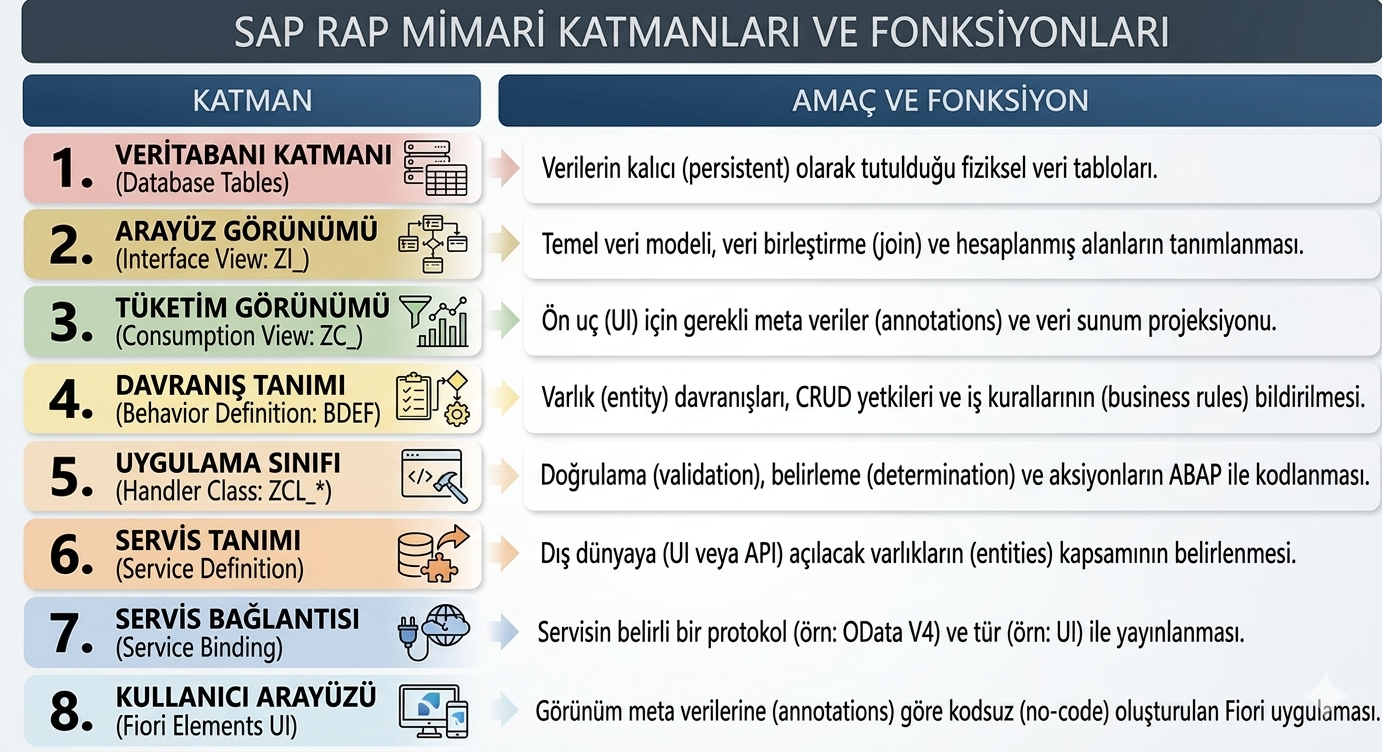
With the increasing adoption of the RESTful ABAP Programming Model (RAP), SAP developers are encouraged to move away from classic procedural approaches and design applications that are behavior-driven, scalable, and Fiori-ready. While RAP provides powerful standard operations such as create, update, and delete, real-world business scenarios often require mass processing or bulk updates triggered by user actions.
In this blog, I will walk through a practical implementation of mass update using a custom action in RAP. This approach is especially useful when you need to update multiple records based on business logic that cannot be handled by standard CRUD operations alone.
Solution Overview:
The blog covers:
Why custom actions are required for mass updates in RAP
How to define a custom action in the Behavior Definition
Implementing the action logic in the Behavior Implementation class
Triggering the mass update from a Fiori Elements UI
Key considerations and best practices
Database Table:
@EndUserText.label : ‘travel uuid table’
@AbapCatalog.enhancement.category : #NOT_EXTENSIBLE
@AbapCatalog.tableCategory : #TRANSPARENT
@AbapCatalog.deliveryClass : #A
@AbapCatalog.dataMaintenance : #RESTRICTED
define table zuuid_table {
key client : abap.clnt not null;
key travel_id : sysuuid_x16 not null;
description : /dmo/description;
status : /dmo/travel_status;
@Semantics.amount.currencyCode : ‘zuuid_table.currency_code’
booking_fee : /dmo/booking_fee;
@Semantics.amount.currencyCode : ‘zuuid_table.currency_code’
total_price : /dmo/total_price;
currency_code : /dmo/currency_code;
createdby : syuname;
createdat : timestampl;
lastchangedby : syuname;
lastchangedat : abp_locinst_lastchange_tstmpl;
}
Root Entity:
@AccessControl.authorizationCheck: #MANDATORY
@Metadata.allowExtensions: true
@ObjectModel.sapObjectNodeType.name: ‘ZUUID_TABLE’
@EndUserText.label: ‘###GENERATED Core Data Service Entity’
define root view entity ZR_UUID_TABLE
as select from zuuid_table as R_UUID_TABLE
{
key travel_id as TravelID,
description as Description,
status as Status,
@Semantics.amount.currencyCode: ‘CurrencyCode’
booking_fee as BookingFee,
@Semantics.amount.currencyCode: ‘CurrencyCode’
total_price as TotalPrice,
currency_code as CurrencyCode,
createdby as Createdby,
createdat as Createdat,
lastchangedby as Lastchangedby,
@Semantics.systemDateTime.localInstanceLastChangedAt: true
lastchangedat as Lastchangedat
}
Projection View:
@Metadata.allowExtensions: true
@Metadata.ignorePropagatedAnnotations: true
@EndUserText: {
label: ‘###GENERATED Core Data Service Entity’
}
@ObjectModel: {
sapObjectNodeType.name: ‘ZUUID_TABLE’
}
@AccessControl.authorizationCheck: #MANDATORY
define root view entity ZC_UUID_TABLE
provider contract transactional_query
as projection on ZR_UUID_TABLE
association [1..1] to ZR_UUID_TABLE as _BaseEntity on $projection.TravelID = _BaseEntity.TravelID
{
key TravelID,
Description,
Status,
@Semantics: {
amount.currencyCode: ‘CurrencyCode’
}
BookingFee,
@Semantics: {
amount.currencyCode: ‘CurrencyCode’
}
TotalPrice,
CurrencyCode,
Createdby,
Createdat,
Lastchangedby,
@Semantics: {
systemDateTime.localInstanceLastChangedAt: true
}
Lastchangedat,
_BaseEntity
}
Metadata Extension:
@ui.lineItem: [ {
position: 10 ,
label: ‘Modify Status’, type: #FOR_ACTION, dataAction: ‘UpdateStatus’
} ]
@ui.selectionField: [ {
position: 10
} ]
Root Behavior Definition:
define action in BDEF.parameter which defines inputs for our actions.managed implementation in class ZBP_R_UUID_TABLE unique;
strict ( 2 );
with draft;
extensible;
define behavior for ZR_UUID_TABLE alias R_UUID_TABLE
persistent table ZUUID_TABLE
extensible
draft table ZUUID_TABLE_D
etag master Lastchangedat
lock master total etag Lastchangedat
authorization master( global )
{
field ( readonly )
TravelID,
Lastchangedat;
field ( numbering : managed )
TravelID;
create;
update(features : instance );
delete(features : global);
action(features : global) UpdateStatus parameter zstatus_str;
draft action Activate optimized;
draft action Discard;
draft action Edit;
draft action Resume;
draft determine action Prepare;
mapping for ZUUID_TABLE corresponding extensible
{
TravelID = travel_id;
Description = description;
Status = status;
BookingFee = booking_fee;
TotalPrice = total_price;
CurrencyCode = currency_code;
Createdby = createdby;
Createdat = createdat;
Lastchangedby = lastchangedby;
Lastchangedat = lastchangedat;
}
}
Parameter For Action:
@EndUserText.label : ‘staus structure’
@AbapCatalog.enhancement.category : #NOT_EXTENSIBLE
define structure zstatus_str {
status : /dmo/travel_status;
}
Implementation:
METHOD UpdateStatus.
MODIFY ENTITIES OF zr_uuid_table IN LOCAL MODE ENTITY r_uuid_table
UPDATE FIELDS ( Status ) WITH VALUE #( for key in keys
( %key-TravelID = key-TravelID
Status = key-%param-status ) )
REPORTED data(lt_reported)
FAILED data(lt_failed).
ENDMETHOD.
Explanation:
MODIFY ENTITIES is the RAP statement used to change data in a behavior-managed entity.IN LOCAL MODE ensures the operation runs within the current LUW without immediately committing to the database.UPDATE FIELDS Status explicitly restricts the update to the Status field only, improving clarity and performance.keys contains all selected instances for which the action is triggered.The FOR expression loops over each selected key, enabling mass processing in a single statement.%key-TravelID identifies the record to be updated.key-%param-status retrieves the action parameter value passed from the UI for ex, a new status selected by the user.lt_reported captures informational, warning, or success messages generated during the update.lt_failed contains records that could not be updated due to validation errors, authorization issues, or business rule violations.These tables are automatically processed by RAP and reflected back to the UI, ensuring proper user feedback.
Projection BDEF:
expose our custom action in projection behavior definition.projection implementation in class ZBP_C_UUID_TABLE unique;
strict ( 2 );
extensible;
use draft;
use side effects;
define behavior for ZC_UUID_TABLE alias R_UUID_TABLE
extensible
use etag
{
use create;
use update;
use delete;
use action Edit;
use action Activate;
use action Discard;
use action Resume;
use action Prepare;
use action UpdateStatus;
}
Preview:
select records and click on modify status button.Assign any travel status and it will be updated.
Conclusion:
Custom actions in RAP provide a clean and scalable way to handle mass update scenarios that go beyond standard CRUD operations. By leveraging MODIFY ENTITIES, action parameters, and RAP-managed messaging, developers can implement efficient bulk updates while fully adhering to RAP principles. This approach ensures better performance, cleaner code, and seamless integration with Fiori Elements, making it a recommended pattern for real-world business requirements.
Introduction:With the increasing adoption of the RESTful ABAP Programming Model (RAP), SAP developers are encouraged to move away from classic procedural approaches and design applications that are behavior-driven, scalable, and Fiori-ready. While RAP provides powerful standard operations such as create, update, and delete, real-world business scenarios often require mass processing or bulk updates triggered by user actions.In this blog, I will walk through a practical implementation of mass update using a custom action in RAP. This approach is especially useful when you need to update multiple records based on business logic that cannot be handled by standard CRUD operations alone.Solution Overview:The blog covers:Why custom actions are required for mass updates in RAPHow to define a custom action in the Behavior DefinitionImplementing the action logic in the Behavior Implementation classTriggering the mass update from a Fiori Elements UIKey considerations and best practicesDatabase Table:@EndUserText.label : ‘travel uuid table’
@AbapCatalog.enhancement.category : #NOT_EXTENSIBLE
@AbapCatalog.tableCategory : #TRANSPARENT
@AbapCatalog.deliveryClass : #A
@AbapCatalog.dataMaintenance : #RESTRICTED
define table zuuid_table {
key client : abap.clnt not null;
key travel_id : sysuuid_x16 not null;
description : /dmo/description;
status : /dmo/travel_status;
@Semantics.amount.currencyCode : ‘zuuid_table.currency_code’
booking_fee : /dmo/booking_fee;
@Semantics.amount.currencyCode : ‘zuuid_table.currency_code’
total_price : /dmo/total_price;
currency_code : /dmo/currency_code;
createdby : syuname;
createdat : timestampl;
lastchangedby : syuname;
lastchangedat : abp_locinst_lastchange_tstmpl;
}Root Entity:@AccessControl.authorizationCheck: #MANDATORY
@Metadata.allowExtensions: true
@ObjectModel.sapObjectNodeType.name: ‘ZUUID_TABLE’
@EndUserText.label: ‘###GENERATED Core Data Service Entity’
define root view entity ZR_UUID_TABLE
as select from zuuid_table as R_UUID_TABLE
{
key travel_id as TravelID,
description as Description,
status as Status,
@Semantics.amount.currencyCode: ‘CurrencyCode’
booking_fee as BookingFee,
@Semantics.amount.currencyCode: ‘CurrencyCode’
total_price as TotalPrice,
currency_code as CurrencyCode,
createdby as Createdby,
createdat as Createdat,
lastchangedby as Lastchangedby,
@Semantics.systemDateTime.localInstanceLastChangedAt: true
lastchangedat as Lastchangedat
}Projection View:@Metadata.allowExtensions: true
@Metadata.ignorePropagatedAnnotations: true
@EndUserText: {
label: ‘###GENERATED Core Data Service Entity’
}
@ObjectModel: {
sapObjectNodeType.name: ‘ZUUID_TABLE’
}
@AccessControl.authorizationCheck: #MANDATORY
define root view entity ZC_UUID_TABLE
provider contract transactional_query
as projection on ZR_UUID_TABLE
association [1..1] to ZR_UUID_TABLE as _BaseEntity on $projection.TravelID = _BaseEntity.TravelID
{
key TravelID,
Description,
Status,
@Semantics: {
amount.currencyCode: ‘CurrencyCode’
}
BookingFee,
@Semantics: {
amount.currencyCode: ‘CurrencyCode’
}
TotalPrice,
CurrencyCode,
Createdby,
Createdat,
Lastchangedby,
@Semantics: {
systemDateTime.localInstanceLastChangedAt: true
}
Lastchangedat,
_BaseEntity
}Metadata Extension:@ui.lineItem: [ {
position: 10 ,
label: ‘Modify Status’, type: #FOR_ACTION, dataAction: ‘UpdateStatus’
} ]
@ui.selectionField: [ {
position: 10
} ]
Root Behavior Definition:define action in BDEF.parameter which defines inputs for our actions.managed implementation in class ZBP_R_UUID_TABLE unique;
strict ( 2 );
with draft;
extensible;
define behavior for ZR_UUID_TABLE alias R_UUID_TABLE
persistent table ZUUID_TABLE
extensible
draft table ZUUID_TABLE_D
etag master Lastchangedat
lock master total etag Lastchangedat
authorization master( global )
{
field ( readonly )
TravelID,
Lastchangedat;
field ( numbering : managed )
TravelID;
create;
update(features : instance );
delete(features : global);
action(features : global) UpdateStatus parameter zstatus_str;
draft action Activate optimized;
draft action Discard;
draft action Edit;
draft action Resume;
draft determine action Prepare;
mapping for ZUUID_TABLE corresponding extensible
{
TravelID = travel_id;
Description = description;
Status = status;
BookingFee = booking_fee;
TotalPrice = total_price;
CurrencyCode = currency_code;
Createdby = createdby;
Createdat = createdat;
Lastchangedby = lastchangedby;
Lastchangedat = lastchangedat;
}
}Parameter For Action:@EndUserText.label : ‘staus structure’
@AbapCatalog.enhancement.category : #NOT_EXTENSIBLE
define structure zstatus_str {
status : /dmo/travel_status;
}Implementation: METHOD UpdateStatus.
MODIFY ENTITIES OF zr_uuid_table IN LOCAL MODE ENTITY r_uuid_table
UPDATE FIELDS ( Status ) WITH VALUE #( for key in keys
( %key-TravelID = key-TravelID
Status = key-%param-status ) )
REPORTED data(lt_reported)
FAILED data(lt_failed).
ENDMETHOD. Explanation:MODIFY ENTITIES is the RAP statement used to change data in a behavior-managed entity.IN LOCAL MODE ensures the operation runs within the current LUW without immediately committing to the database.UPDATE FIELDS Status explicitly restricts the update to the Status field only, improving clarity and performance.keys contains all selected instances for which the action is triggered.The FOR expression loops over each selected key, enabling mass processing in a single statement.%key-TravelID identifies the record to be updated.key-%param-status retrieves the action parameter value passed from the UI for ex, a new status selected by the user.lt_reported captures informational, warning, or success messages generated during the update.lt_failed contains records that could not be updated due to validation errors, authorization issues, or business rule violations.These tables are automatically processed by RAP and reflected back to the UI, ensuring proper user feedback.Projection BDEF:expose our custom action in projection behavior definition.projection implementation in class ZBP_C_UUID_TABLE unique;
strict ( 2 );
extensible;
use draft;
use side effects;
define behavior for ZC_UUID_TABLE alias R_UUID_TABLE
extensible
use etag
{
use create;
use update;
use delete;
use action Edit;
use action Activate;
use action Discard;
use action Resume;
use action Prepare;
use action UpdateStatus;
}Preview:select records and click on modify status button.Assign any travel status and it will be updated. Conclusion:Custom actions in RAP provide a clean and scalable way to handle mass update scenarios that go beyond standard CRUD operations. By leveraging MODIFY ENTITIES, action parameters, and RAP-managed messaging, developers can implement efficient bulk updates while fully adhering to RAP principles. This approach ensures better performance, cleaner code, and seamless integration with Fiori Elements, making it a recommended pattern for real-world business requirements. Read More Technology Blog Posts by Members articles
#SAP
#SAPTechnologyblog